Showing posts with label Parallel Data Warehouse. Show all posts

Wednesday, May 6, 2015

PDW Database Restore

Using below command you find the backup header information for all backup sets on a given backup devise

Restore headeronly from disk = '\\10.10.10.10\PDWBackups\FullBackup_02052015\DWLOADER_staging'


Restore a database using Full backup 

Restore database DBAAdmin from disk = '\\10.10.10.10\PDWBackups\FULL\05052015\AdventureWorksPDW2012.bak'


Restore a database using differential backup 

Restore Database DBAAdmin1 from disk = '\\10.10.10.10\PDWBackups\FULL\05052015\AdventureWorksPDW2012_Diff.bak' 
with BASE = '\\10.10.10.10\PDWBackups\FULL\05052015\AdventureWorksPDW2012.bak'  
 
In above statement full backup is '\\10.10.10.10\PDWBackups\FULL\05052015\AdventureWorksPDW2012.bak'  

and differential backup is \\10.10.10.10\PDWBackups\FULL\05052015\AdventureWorksPDW2012_Diff.bak' 


Limitations in the restoration is 

The backup set can only be restored to a SQL Server PDW destination appliance that has the same number or more Compute nodes than the source appliance. It cannot have fewer Compute nodes than the source appliance.

Monday, May 4, 2015

PDW Database Backup


The backup is stored in the G:\Backups directory on the appliance 

There are two type of backup 
Full Backup : A full database backup is a backup of an entire  PDW database similar to SQL Server Backup.

Differential Backup :A differential database backup only includes changes made since the last full PDW Database backup 

Syntax :  FULL BACKUP 

use master

backup database AdventureWorksPDW2012 to disk = '\\10.10.10.10\PDWBackups\FULL\05052015\AdventureWorksPDW2012.bak' 

The above statement creates the full backup of of the AdventureWorksPDW2012 database . The backup will be stored in \\10.10.10.10\PDWBackups\FULL\05052015\ location. To grant access on this shared location please use sp_pdw_add_network_credentials  command 


Syntax :  DIFFERENTIAL BACKUP 
backup database AdventureWorksPDW2012 to disk = '\\10.10.10.10\PDWBackups\DIFFERENTIAL\05052015\AdventureWorksPDW2012.bak with differential' 

 
You can not perform differential backup on master database

You can copy a database to a different appliance by copying the backup files to the G:\Backups directory on the Backup node of the target appliance and then performing a restore. However, copying backup files to a different location can negatively impact restore performance. This can occur when the logical disk storage for the backup files varies from the original backup directory.
The target appliance for restoring the backup must have at least as many Compute nodes as the source appliance. The target can have more Compute nodes than the source appliance, but cannot have fewer Compute nodes.


Sunday, May 3, 2015

Execute queries in PDW

After login into PDW Server ( How to Login into PDW )

 Right click on the server name and click on New Query option in the pop-up window

It will open new window in right side 


Type the query to execute in right side window 


to execute query use below option 

 Mark the query which you want to execute and use CTRL + SHIFT+ E

or Mark the query which you want to execute and click on the below button


it use master database and execute the query and shown below results 


use below options to show the results in grid,text, file


How to connect PDW


You can login pdw using MS Visual Studio 2012/SQL Data Tools  or Nexus Query Chameleon


Lets try using Visual Studio 2012 

Goto Visual Studio 2012 icon and click 


Click on Run the program without getting help

you can see 


Click on View and select SQL Server Object Explorer 


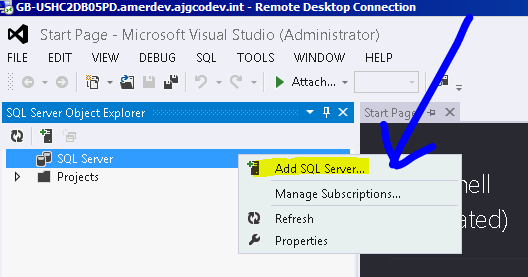
now you can see below screen right click on the SQL Server 


Select Add SQL Server 


Provide the PDW server and Login & password details ( you can login using SQL Authentication or using Windows Authentication) 

and click on connect 

How to grant access on backup shared in PDW


How to grant access on backup shared in PDW

To backup the database we have to assign access permissions to a windows account that has write access to a file share on a target server.
sp_pdw_add_network_credentials '10.10.10.10','corp\adAcctLogin', 'PassWord'

To remove access to shared path  
sp_pdw_add_network_credentials '10.10.10.10','corp\adAcctLogin', 'PassWord'

To check who are all having permissions 
select * from sys.dm_pdw_network_credentials


Friday, May 1, 2015

How to check the database size in PDW

Using below DBCC command via NEXUS query editor or SQL Server DATATOOL or Visual Studio

USE DATABASE_NAME

dbcc pdw_showspaceused


You can view the size in Mega Bytes  


Cannot access the specified path or file on the server. Verify that you have the necessary security privileges and that the path or file exists

If you received below error while attaching a .mdf file in cluster environment please follow below steps to resolve the issue ERROR Ca...